
Bid teams
Background, solutions and methods from previous proposals, with their validity checked.
03 · AI & digital transformation
Designs, manuals, drawings, test reports and minutes turned into an archive you can query. Every answer from the copilot cites the document and page it comes from, and warns you when information is missing or two sources disagree.

Demonstration · Sample documents
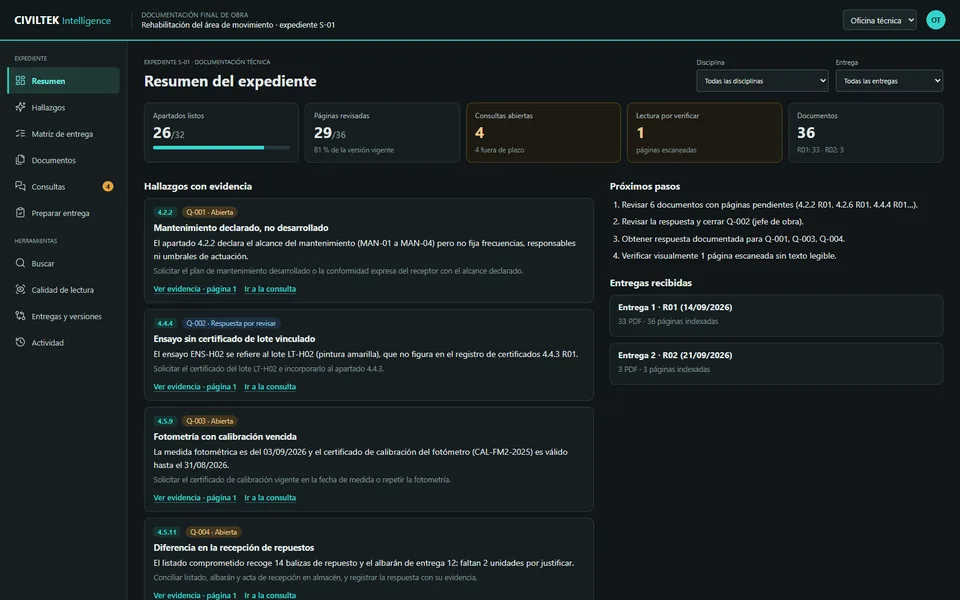
Before handing over the final project documentation, every requirement needs its evidence. The application sorts the PDFs by the contract index and flags whatever does not add up.
Try it with your own PDFs
The demo loads the 58-page manual of a centrifugal pump, classifies its content into safety, installation, maintenance and troubleshooting, and lets you search, compare documents and save references.

How we set it up
A search engine is no use if there are superseded drawings, contradictory instructions or documents from several projects mixed together. The work starts by knowing what each file is and whether it is still current.
By project, facility, asset, discipline and type. Duplicates, revisions and scans that need OCR are identified.
Answers linked to the document and the page. What was found and what was inferred are kept apart.
Access by team or project. A withdrawn version also disappears from the answers.
Your team defines queries and expected answers; we measure accuracy before extending use.
Who it is for
Background, solutions and methods from previous proposals, with their validity checked.
Design, variations, minutes and instructions; close-out documentation prepared during construction.
Manuals, data sheets and drawings per item of equipment, together with its intervention history.
Technical and planning files that can be found from the plot or the asset.
Frequently asked questions
The copilot works on an organised archive with versions and permissions, and every answer links to the source page. If the information is missing or contradictory, it says so instead of making it up.
Scanned PDFs need OCR and a quality review. We identify which documents are in that situation during the inventory; automatic reading does not guarantee that every table or annotation is interpreted correctly.
Access is defined by team, project, contract or site, and also applies to the copilot's answers.
Hosting and the AI provider's terms are reviewed with the company before any documentation is uploaded.
With a set of real questions and their expected answers, prepared by your technical team. We check sources, accuracy and permissions before extending use.
Related
Daily reports, subcontractor quantities and draft payment applications.
See solution → IndustryDigital twin, inspections and equipment maintenance.
See solution → Public sectorGIS viewers, inventories and copilots for public authorities.
See solution →Your technical archive
With a sample of folders and ten real questions from your team, we assess the inventory and the copilot.